On this page
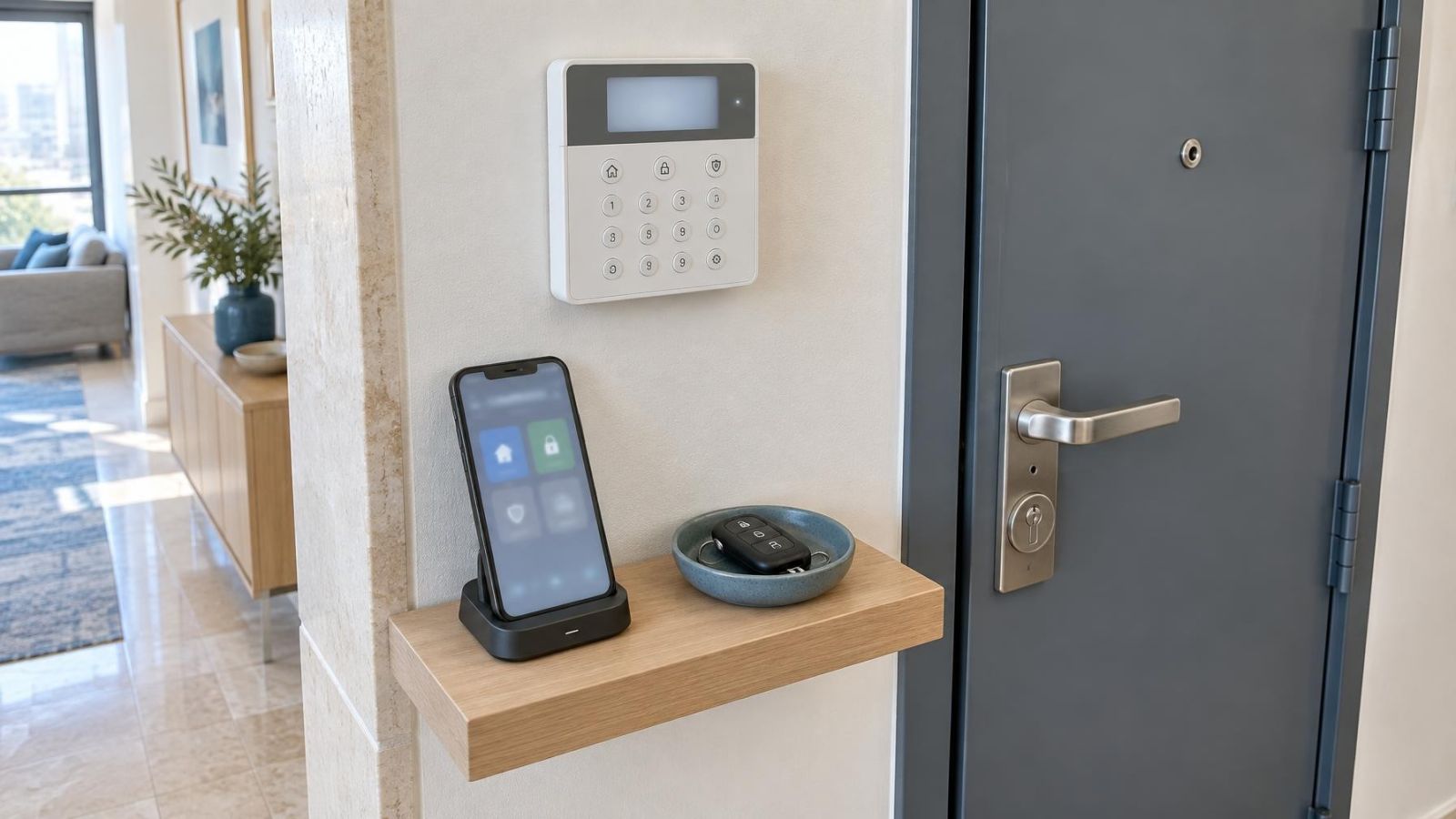
An alarm keypad beside the entrance, a mobile app on a personal phone and an alarm key fob on a keyring can all operate the same alarm control panel. For a homeowner or small-business owner, the important question is not which interface looks most modern. It is how to arm an alarm reliably when different people arrive, leave, open the shop, clean the property or check it from elsewhere. The right answer usually combines one primary method for daily use with a second method for ordinary disruptions.
These alarm control options are not interchangeable. Each changes who can operate the system, how access is withdrawn, what happens when equipment is unavailable and how clearly activity can be attributed to a person. The decision should therefore begin with users and routines, not with the control device.
Start with daily users
List everyone who will arm or disarm the property during a normal week. In a home, that may include adults, children, older relatives, a cleaner and someone checking the property while the owner is abroad. In a business, it may include an opening manager, several employees, a cleaner and a temporary worker.
Then consider what each person can use comfortably. A child may remember a short user code but should not have broad app permissions. An older relative may prefer a visible keypad to navigating a phone. A cleaner may need access only at agreed times, without the ability to change settings or view activity belonging to other users.
- Daily users: Give each regular user a method that fits the way they enter and leave.
- Temporary users: Provide only the controls needed for the task, and make removal straightforward.
- Remote owners: Keep local control available for people physically at the property.
- Shared access: Decide whether convenience is worth losing individual identification.
Shared credentials appear simple, but they become difficult to manage. If everyone uses one code, changing access for one person affects everyone. A shared fob can be passed around without a clear record of who held it. Individual codes or app accounts are generally easier to review, update and remove.
Alarm app or keypad?
Is an alarm app or keypad better at the entrance?
A keypad is usually the more direct entrance control. It remains in a known position and does not require a personal phone. Users enter a code, select the required arming mode and receive local feedback from the system. This is useful when several people share an entrance or when phones are not permitted, charged or immediately available.
A mobile app is strongest when control must extend beyond the entrance. Depending on the system and connection available, an authorised user may check status, arm remotely, receive push notifications, review an activity log or manage user permissions. These functions are valuable for remote property owners and business managers who are not always present at opening or closing.
| Consideration | Keypad | Mobile app |
|---|---|---|
| Entrance speed | Fixed location and direct code entry | Requires phone access and app readiness |
| User identification | Individual user codes supported by suitable systems | Individual accounts supported by suitable systems |
| Remote control | Local operation | Available when the system and connection support it |
| Main dependency | Alarm system power and local hardware | Working phone, account access and relevant connectivity |
| Best fit | Repeated local entry and exit | Remote status, notifications and account management |
The app should not automatically replace the keypad. At the door, unlocking a phone, finding the app and resolving a login problem can be slower than entering a familiar code. Conversely, a keypad cannot provide the same convenient remote access. Many properties work best with a keypad for routine entry and an app for oversight.
When is remote alarm arming useful?
Remote arming is useful when nobody can easily return to the property. A homeowner may want to check status after leaving, while a business owner may need to confirm whether the closing routine was completed. The activity log can provide context, but it should be read carefully: a recorded command identifies the credential or account used, which is most informative when access is not shared.
Where a key fob fits
What is an alarm key fob?
An alarm key fob is a small wireless control with buttons for common commands such as arming and disarming. It avoids code entry and can be quick to use from a gate, driveway or entrance. It also works without asking the user to open an app.
Its simplicity creates the main trade-off. A fob can be lost, carried away or passed to another person. If one is missing, the system should allow it to be identified and removed from use without disrupting every other user. Labelling fobs in the system by person or role makes reassignment easier, even if the button press itself provides less user detail than an individual code or app account.
- A fob suits users who need a small number of clear, repeatable commands.
- A fob can be practical when someone regularly approaches through a garden gate or parking area.
- A shared fob provides limited accountability because possession can change without an account change.
- A missing fob should be treated as an access-management task, not merely as a missing keyring item.
For a temporary visitor, a fob is not always the simplest choice. Someone must issue it, explain it, collect it and notice if it is not returned. A removable user code may be easier to administer when the person already knows how to use a keypad.
Arming modes and feedback
The control method must make the selected arming mode clear. Full arming is intended for areas that should be monitored when people leave. Partial arming keeps selected areas active while people remain inside. In an Israeli home, partial arming may be useful at night when perimeter areas need monitoring but bedrooms, corridors or access to the mamad remain in use.
A good routine answers three questions without guesswork: which areas are active, how long the user has to leave or enter, and whether the command was accepted. A keypad can provide local text, lights or tones. A fob may offer more limited feedback, so users may need confirmation from the control panel or another indicator. An app can show status and send push notifications, but those messages depend on the phone and relevant connection.
Entry and exit routines should be designed around real movement. Someone carrying shopping through an apartment door has different needs from an employee lifting a shutter and switching on lights. The delay must allow the normal route to the control point without encouraging people to rush.
Plan for ordinary disruptions
Every primary control method has a predictable point of inconvenience. Phones run flat. Internet service is interrupted. Fobs are misplaced. Codes are forgotten. The alarm control panel may have a backup battery, but that does not solve every control or communication problem around it.
A second method should cover the weak point of the first. If the app is primary, a keypad gives local control when the phone or connection is unavailable. If a fob is primary, a memorised individual code avoids dependence on a small object. If the keypad is primary, an app can help an authorised person manage access or check status from elsewhere.
- Flat phone battery: Keep a local keypad or assigned fob available.
- Internet interruption: Confirm which commands remain available locally.
- Misplaced fob: Know how to identify and remove the missing credential.
- Forgotten code: Use an established reset process rather than sharing another person's code.
- Unavailable primary method: Make sure regular users understand the backup before they need it.
The backup should be genuinely usable. A keypad does not help if nobody remembers a code. An app does not help a cleaner who has no account. A spare fob in an inaccessible cabinet is not part of a practical entrance routine.
Match control to the property
In an apartment, the alarm normally begins at the private front door, not at the building's shared entrance. Residents may pass through an intercom-controlled lobby, stairs or a lift before reaching the keypad. The arming and entry timing should reflect the route inside the apartment rather than activity in shared building areas. Any equipment proposed for a shared entrance also needs agreement about who will use and manage it.
A private home may have a pedestrian gate, vehicle gate, garden path and several doors. A key fob can be convenient before reaching the house, but wireless reach must be tested from the places where it will actually be pressed. An internal keypad remains useful for clear status and mode selection.
The mamad requires attention during planning because its construction and door position can affect wireless communication. Do not assume an app-connected device, wireless keypad or fob will behave identically inside every room. Test signal reach with doors in their normal positions, especially if the mamad is used as a bedroom, office or storage room visited during the arming routine.
For a street-front business, opening and closing often involve several actions: unlocking an outer barrier, entering, disarming, switching on lighting and preparing the public area. The primary control should sit naturally within that sequence. Named access is particularly useful when different employees open and close, because an activity log is clearer when credentials are individual.
Strong sunlight, dust and coastal humidity also affect placement. A control device used near an exposed gate needs a suitable location and enclosure, while a phone screen can be difficult to read in glare. Environmental exposure should not be solved by placing the control somewhere inconvenient.
How to arm an alarm: which combination should you choose?
Choose the primary method according to the most common routine, then choose the secondary method according to the most likely disruption. For many homes, that means a keypad at the usual entrance and an app for owners who want remote access. A fob can be added for a person who benefits from button-based control.
A small business may use individual keypad codes for staff, app access for the owner or manager, and carefully assigned fobs for roles that require fast entry. The exact mix matters less than keeping identities and permissions clear. Each user should receive only the ability needed to arm, disarm, view status or manage other users.
- Map the real entry, exit, opening and closing routines.
- Assign a primary control method to each type of regular user.
- Create individual codes or accounts wherever activity needs to be attributable.
- Set limited permissions for children, employees, cleaners and temporary visitors.
- Choose a backup method that does not share the same point of failure as the primary method.
- Test full and partial arming with every regular user before treating the setup as complete.
Permission decisions are best made before installation. Decide who may disarm, who may arm only, who may use remote control, who may see activity and who may add or remove users. Making those choices early keeps the interface simpler and avoids turning one administrator account into a shared credential.
Finally, put the controls in people's hands. Ask each user to enter, disarm, leave, select the correct mode and recognise the confirmation. The best combination is not the one with the longest feature list. It is the one regular users can operate calmly, with a workable alternative when their preferred method is unavailable.
Key takeaways
- An alarm keypad provides dependable local control without requiring a personal phone.
- A mobile app is useful for remote access, activity review and managing individual permissions.
- An alarm key fob offers fast, simple operation but needs a clear process for loss and reassignment.
- Individual codes and app accounts make activity easier to attribute than shared credentials.
- A backup control method keeps arming and disarming practical when the preferred method is unavailable.